

How to organize an AcroYoga festival or event, step by step
Jam, workshop, festival or retreat: the steps of organizing an AcroYoga event with a checklist, from venue and tickets to flyer and base balance and check-in.
 By Sandro, founder of AcroSpot5 min read

Somebody says it in the closing circle of a jam: "We should do a weekend with real teachers." Three months later you have forty open browser tabs. The venue wants a deposit, a Google Form asks flyer or base, the spreadsheet no longer matches the bank statement, and the WhatsApp group asks about the vegan lunch every day. Two weeks before the start you notice: far more flyers than bases.
None of this means you are bad at organizing. An AcroYoga event just has many moving parts: roles, levels, pairs, beds and meals. This guide goes through them in order, from the first idea to the last hug, and links to deeper articles where a topic needs more room. Below: how to do it with any tool, and how AcroSpot saves you the Friday-night spreadsheet.
Choose the right kind of event
The kind decides how much work lies ahead:
- Jam: free training without teaching. The space is there, people just come.
- Class: regular, short, the basics of AcroYoga, no prior knowledge needed.
- Workshop: a few hours on a single trick in depth, with concrete prerequisites.
- Festival: several days and teachers, workshops at the same time.
- Retreat or camp: days away together, with accommodation and food and free time.
First event? Start one size smaller than your dream. A good workshop teaches you more about your community than an exhausting festival.
The steps, with or without any tool
Date, venue and teachers
Fix the date first, then the venue: space, mats, ceiling height for standing acro, showers. Check your region's calendar so you don't clash with a festival next door. Agree with teachers early on what they teach and what they get, in writing, even if it is one e-mail.
Tickets, price tiers and deposits
Plan a few ticket types (full pass, weekend pass) and price tiers that reward early decisions; an Early Bird also tells you early whether the event will happen. A deposit at registration with the rest later makes registrations binding without asking for the full amount months ahead. Write your cancellation terms before the first sale.
Flyer and base balance
Ask everyone for their role and whether they come solo or with a partner, and look at the numbers weekly. When flyers run ahead, say it in your posts: "bases wanted" works.
Registration questions
Ask only what you will use. Every extra question is one more column nobody reads.
Event page, timetable, rooms and food
Build one page that answers what people would ask in the group chat: when, where, which level, what is included, where to sleep. The timetable deserves its own care (how to build a festival timetable), and so does the question of who trains and sleeps in which room (festival rooms and room allocation).
Helpers, team and check-in
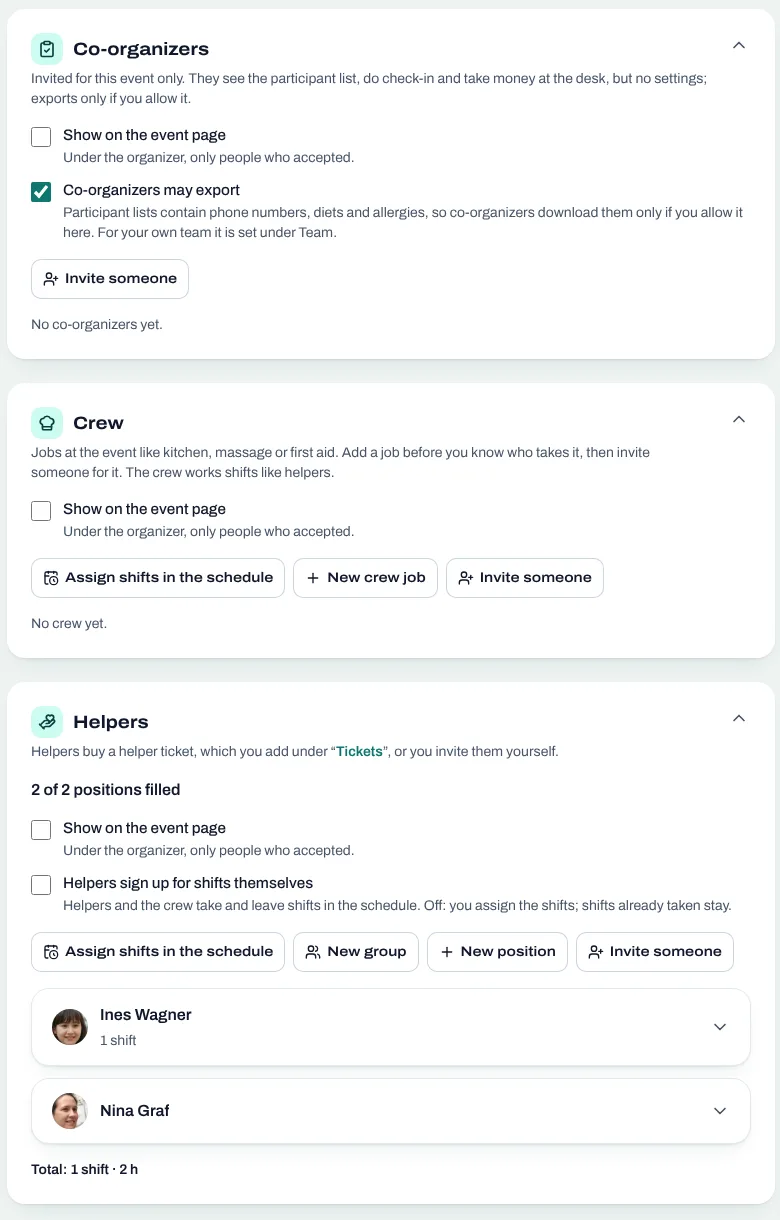
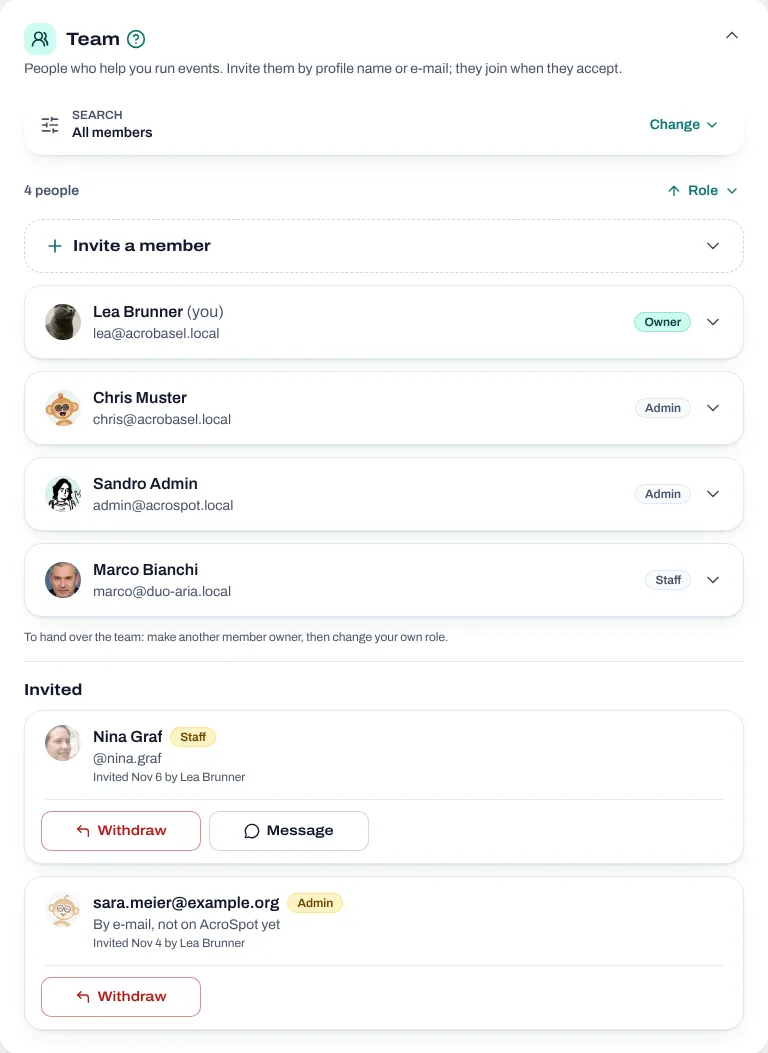
Nobody runs a festival alone. Find helpers for the kitchen, the welcome desk and cleaning, and give them clear shifts (organizing helpers at a festival). If you organize with friends, agree early on who decides what (organizing an event with co-organizers). At the door, have one list: who paid, who owes the rest, who sleeps where.
After the event
Send a short feedback form the day after. Collect the photos in one folder, thank everyone publicly and note three things you would change. That note is the first page of the next edition.
How AcroSpot helps
AcroSpot replaces the forty tabs with one place made for AcroYoga. Participants register with their acro profile, so you never ask "flyer or base?" in a Google Form again. The flyer and base balance, the timetable, the beds and the helper shifts all hang on the same list of people. And you don't start alone: after a short request, the AcroSpot team sets up your first event with you on a call.
Know your flyers and bases before you sell out
Tick one box and the flyer and base balance shows on your event page, so people see where a role is wanted before they buy. Price tiers reward early decisions: Early Bird and Normal by date on every plan, more tiers with your own names and tiers per role (Premium). Participants pay all at once, a deposit now and the rest later, or everything later; online by card, at the event, or directly to you (Premium; TWINT also without).
Registration that fills itself in
Role, level, food and where people travel from come from their reusable profile, so registering is quick, and your own questions ask only the rest. The event page answers the group chat's questions as tiles, with the tickets, the team and who's going.
Timetable, beds and team on one list
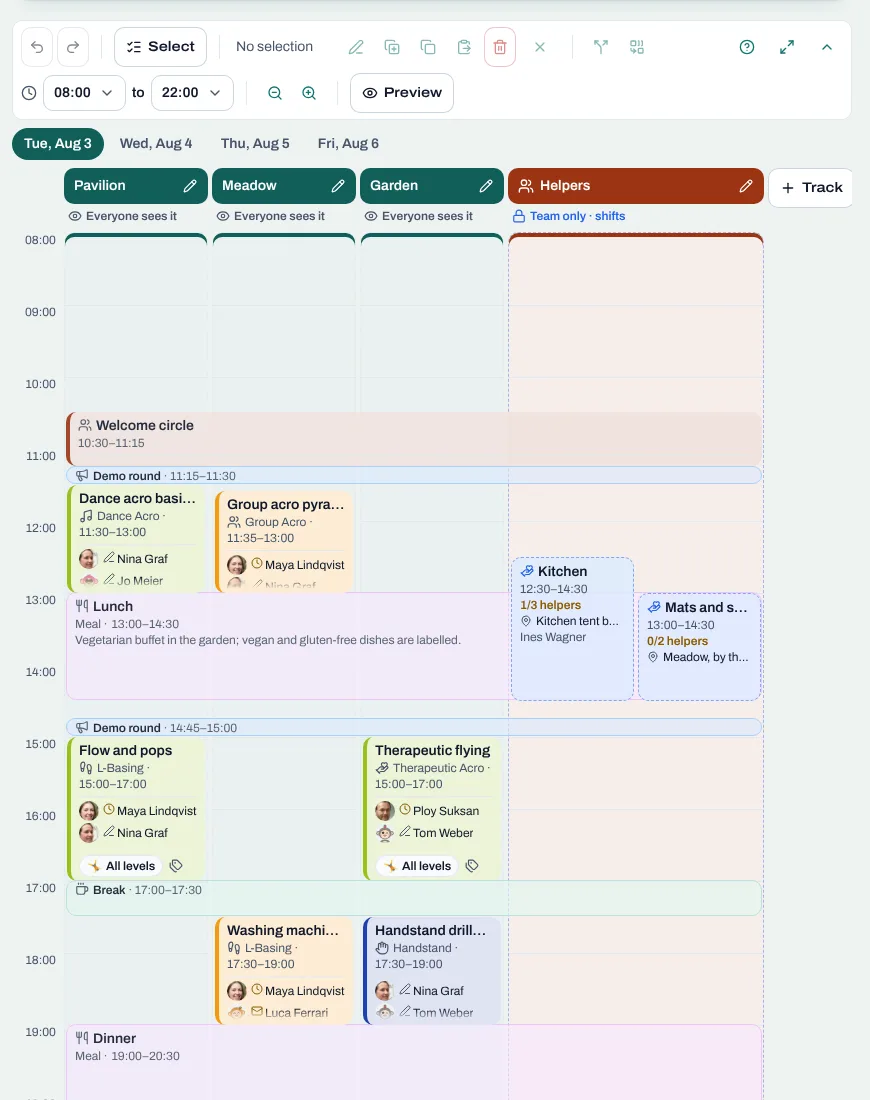
The timetable has tracks, sessions, demo rounds, breaks and meals. Stays and food packages are booked together with the ticket, so every bed already has a name. Co-organizers, crew and helpers sit on one page of the event, next to the participants.
A welcome desk with one list
Every registration shows its next step, and the overview counts roles, levels, food and accommodation, with exports for the cook and the teachers (Premium). At the desk, the phone's normal camera scans the ticket's QR code, and one tap collects the rest, hands over the key and checks the person in. Self check-in works too.
After the event
The morning after, AcroSpot reminds you of the wrap-up: feedback round (Premium), photos, aftermovie, thank-you post. Next year's edition is a few clicks away, with tickets, tiers and questions copied, plus a comparison with the last one.
Coming from WeTravel? See AcroSpot vs WeTravel.
Your checklist
- Kind of event, date and venue
- Teachers confirmed in writing
- Tickets, price tiers, deposit and cancellation terms
- Registration questions: only what you will use
- An event page that answers the group chat's questions
- Timetable, rooms and food
- Helpers, team and a check-in plan
- Feedback, photos, a public thank you and notes for next year
Plan your next festival on AcroSpot: send a short request, and we set up your first event with you on a call. AcroSpot for organizers
Read next
Festival timetable template: how to plan an AcroYoga schedule
A festival timetable template and guide: tracks, slots, demo rounds, breaks, levels and fair teacher loads, and how to change the plan calmly.
5 min readRead
Festival volunteers: how to find, schedule and thank your helpers
Volunteer shifts, helper tickets and a welcome desk you can hand over: how to run an AcroYoga festival with a happy crew instead of doing it all alone.
5 min readRead
Running an AcroYoga festival as a team: roles, money and one inbox
Two people, one festival: how to share decisions, money, participant data and the inbox with co-organizers, and how to hand over without chaos.
5 min readRead