

Festival volunteers: how to find, schedule and thank your helpers
Volunteer shifts, helper tickets and a welcome desk you can hand over: how to run an AcroYoga festival with a happy crew instead of doing it all alone.
 By Sandro, founder of AcroSpot5 min read
It is Saturday, 7:40 in the morning. Breakfast starts in twenty minutes, the coffee machine is not on yet, two late arrivals stand at the welcome desk with their bags, and the teacher of the first Standing workshop asks where the crash mats went. You are the organizer, so everyone looks at you. You also wanted to fly in the Washing Machine session at ten.
AcroYoga festivals, retreats and bigger jams are carried by volunteers. Flyers and bases who cook, clean, sit at the desk or patch up a scraped knee. With a messy plan they burn out, or quietly disappear to the jam. This article is about the middle way: a crew that knows what to do, so you don't have to do everything alone. Below: how to organize your volunteers with any tool, and how AcroSpot lets them pick their own shifts while you go and fly. If you are just starting out, read how to organize an AcroYoga event first.
Three kinds of helpers
Split the people who work at your event into three groups; they need different things from you.
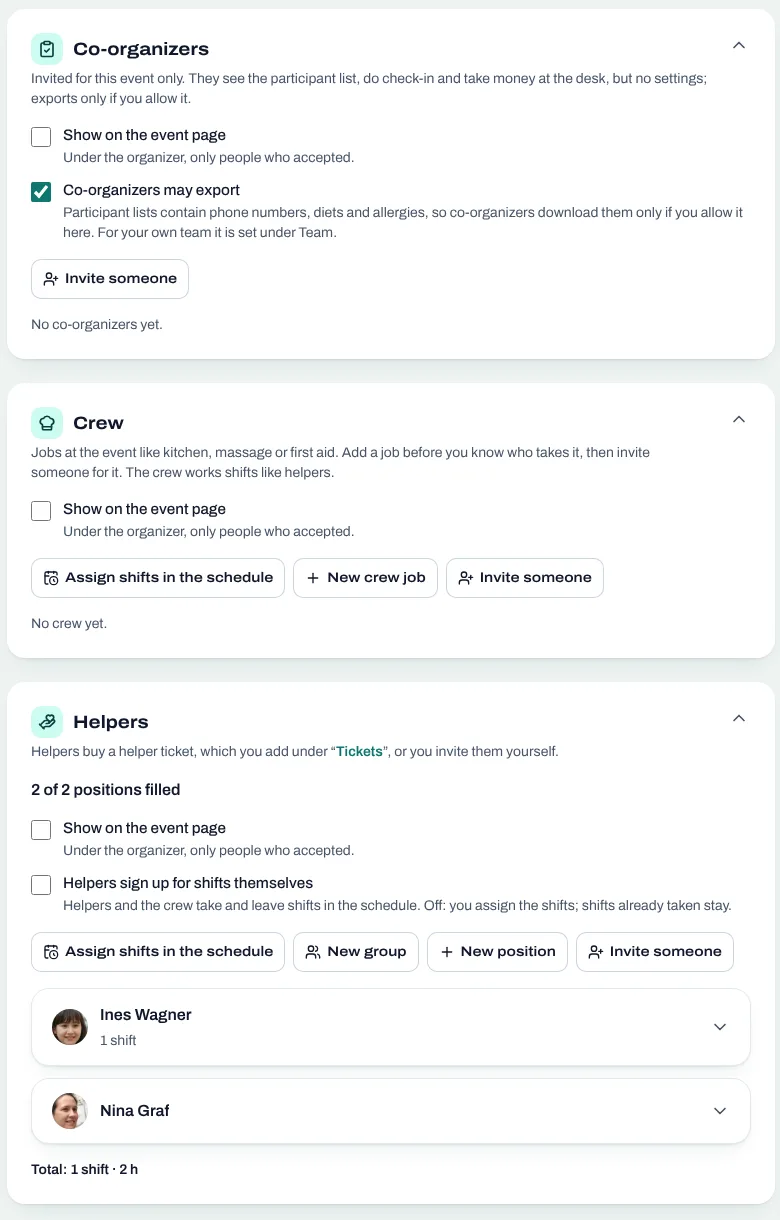
- Co-organizers run the event with you. They know the participant list, check people in and decide things when you are busy. More on that in organizing an event with co-organizers.
- Crew take on one job for the whole event: kitchen, massage, photo and video, first aid, childcare, music. You want the right person, not just any person.
- Shift volunteers give a few hours here and there: cleaning the hall, setting up mats, chopping vegetables, the welcome desk. Here it matters more that every shift is covered than who covers it.
How to organize volunteers, with any tool
Write down the jobs before you look for people
Go through the event hour by hour and list everything that needs hands: setup on Thursday, breakfast every morning, cleaning after lunch, the desk on arrival day, the clean-up on Sunday. Give each job a place ("Kitchen, main building") and a short note on what to do. A spreadsheet with one row per shift is enough to start.
Agree on what volunteers get
A common model: volunteers pay a reduced helper ticket or come for free, and work a fixed number of hours in return. Crew with a demanding job, like the kitchen or first aid, often come for free. Write it into the call for volunteers, so nobody feels cheated later.
Let people choose their shifts
People are happier on shifts they picked. Share the list and let volunteers put their names in, first come, first served; keep a few shifts to give out yourself, for the jobs nobody wants. A shared sheet or a paper board works better than a group chat.
Plan the check-in desk
On arrival day, put two people at the desk: one checks tickets, one hands out keys, extras or wristbands. Whoever checks people in sees the participants' data, so pick someone you trust.
Say thank you, out loud
Name your helpers in the closing circle, give them the first plate at dinner, and ask them afterwards what was hard. Volunteers who felt seen come back, and bring friends.
How AcroSpot helps
On AcroSpot your whole crew lives on one page of your event, next to the participants and the timetable: co-organizers, crew and volunteers, each with their price and their shifts. No separate sheet, no list that goes out of date.
Plan every job before you know who takes it
Add the crew jobs your festival needs, from kitchen and first aid to photo and video or the DJ, and invite the right person for each. Helper places work the same way, also for someone without an AcroSpot account ("Helper 3 (my dad)"), and a group like "Kitchen" bundles five places. Shifts stay with the place, so when someone steps back, the next person takes over the same shifts.
Volunteers sign up like participants
A helper ticket has its own price and places. Sell it directly, so buying it puts the person on your crew, or on request: volunteers say what they can do, and you accept or decline. They can leave a note for the team ("I can only come from the weekend on"), and you can still invite someone for free.
Volunteers pick their own shifts (Premium)
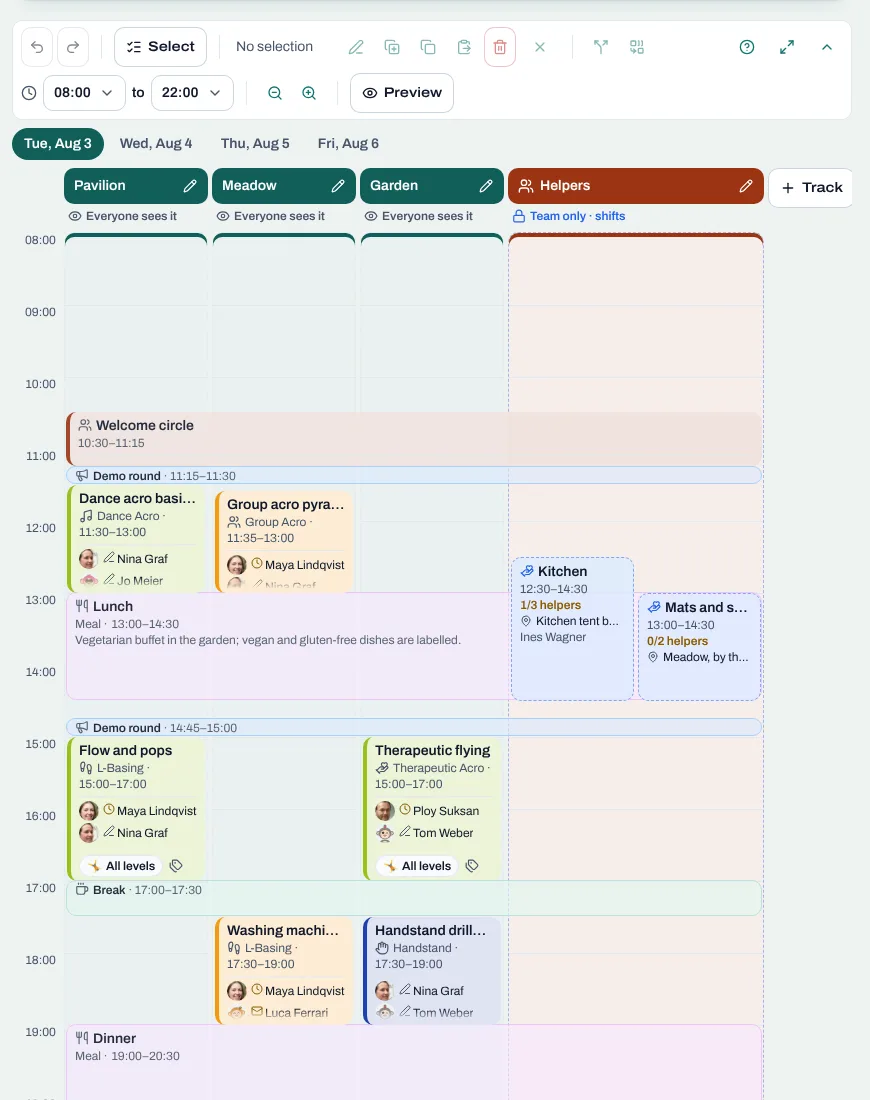
Shifts sit in the same schedule as the workshops, in a track participants don't see, with the task, the place, the times and how many hands are needed. Let volunteers take their own shifts once they hold their ticket, and a full shift closes by itself; or assign them yourself, a whole group like the kitchen crew at once. Everyone hears about their shifts and finds them in their own view and in the PDF. Even the briefing goes into the plan as a team appointment (Premium). More in how to build a festival timetable.
Find volunteers who helped before (Premium)
The team finder suggests people who helped at your events before, and volunteers nearby who like to be asked, filtered by language. One tap opens the invitation with the person filled in.
A welcome desk you can hand over
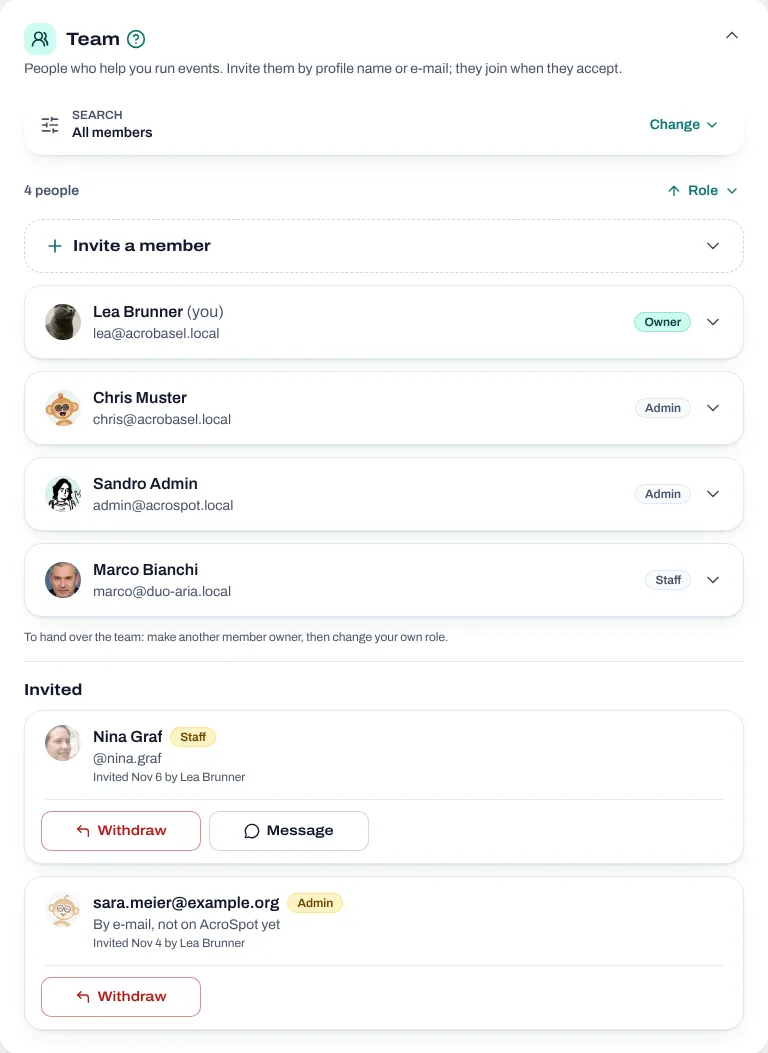
Co-organizers get participants and check-in, and nothing else: the list with a search, ticket scanning with the phone's camera and how well the shifts are covered. They never see your money, your settings or your other events.
Thank them where everyone sees it
When the crew is complete, show it on the event page: your volunteers appear with their picture and name, under the organizer.
Checklist
- List every job and shift, with place and what to do.
- Decide what volunteers get: free or a helper ticket.
- Split the team into co-organizers, crew and shift volunteers.
- Let volunteers pick their shifts, and assign the rest.
- Hold a short briefing before the event.
- Put trusted people at the check-in desk.
- Thank your crew, in public and in person.
Want your crew to pick their own shifts this year? Plan them on AcroSpot (Premium) next to your workshops, and we help you set up the event on a call. AcroSpot for organizers
Read next

How to organize an AcroYoga festival or event, step by step
Jam, workshop, festival or retreat: the steps of organizing an AcroYoga event with a checklist, from venue and tickets to flyer and base balance and check-in.
5 min readRead
Running an AcroYoga festival as a team: roles, money and one inbox
Two people, one festival: how to share decisions, money, participant data and the inbox with co-organizers, and how to hand over without chaos.
5 min readRead
Festival timetable template: how to plan an AcroYoga schedule
A festival timetable template and guide: tracks, slots, demo rounds, breaks, levels and fair teacher loads, and how to change the plan calmly.
5 min readRead